

Watch2Care Quick StartGuide
-
Key Function Button

A1
Function buttons

A2
Key Functions:
-
Press Button to turn on device
-
Press Button to return to previous menu
-
Press Button to access all application
-
FitVibe App

B1
Scroll to “Settings” in Application Menu on Watch2Care
Enter “Settings” Click on “Binding code”

B2
Download FitVibe App on App Store or Google Play Store

B3
Click “+” button and Click “Scan” on Top Right

B4
Hover camera over QR code displayed on Watch2Care

B5
Linked device!
-
FitVibe Home and Profile

C1

C3

C2
Activity Record
-
TCM Report
-
Sleep
-
Heart Rate
-
SpO2
-
Steps

C4
Profile Settings
-
Help and Feeback
-
System Settings
-
About
-
FitVibe Device Section


D1
Synchronise with Watch More devices / Unbind

D2
Setting for Heart Rate
Threshold, Reminder for
Movement to remain active,
Do not Disturb Timings,
Raising Watch to
Wake Screen

Control which apps are allowed to send notifications

D3
-
Function Settings
Alarm and Weather Settings,
Screen On Duration,
Screen Brightness,
Language Switch
-
System Settings
Firmware, System
Informaton, Factory Rese
-
Functional use

E1
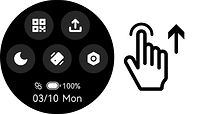
Quick Slide Function Usage
E2
Swipe up to access fast menu

E4
Swipe down to show message notification
E3
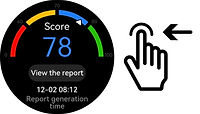
Swipe left and right to cycle through menu

E5
In application, swipe to the right to go back to previous page

F2
① Binding code
② Do not disturb
③ Data collection status
④ Settings menu
⑤ Find phone function

F3
Main Watch Face

F4
TCM Report

F5
Sleep Time

F6
Weather

F7
Scroll through recent messages
Click to clear all messages
-
TCM Report

G1
-
Swipe right of main interface to show “TCM(Traditional Chinese Medicine) Report”. There will be no reports at first use. After wearing for 24 hours, it will display “You have a new report”.
-
Synchronise with FitVibe app and press “View the report” on Watch2Care and click on TCM report on phone to access full report.

G2
Notice: Must be worn for 24 hours to issue a Chinese Medicine Report. If not worn for 6 hours at once, report will not be issued.

G1
-
Result scores out of 100 will be shown for Heart, Liver, Kidney and Spleen. Click on each secton to see scores for individual conditons.
-
Scroll to see all conditons More informaton of Results, Tips to improve and 24 Hour Graphs to improve on FitVibe app


-
Heart Rate / SpO2


-
Heart Rate
-
Open Heart Rate Application in Menu Press “Start” button and hold arm still to measure heart rate.
View history over 24 hours More information on FitVibe app


-
Blood oxygen saturation
-
Open SpO2 Application in Menu.
Press “Start” button, adjust arm position, measure blood oxygen level.
View history over 24 hours More information on FitVibe app
-
Watch Face Customisation

-
Long press on main watch face to access custom watch faces.
-
It can be accessed through settings


6 Custom Options of Watch Face
-
Sleep Tracking

Sleep while wearing watch, open “Sleep” application to see period of total sleep time, deep sleep and light sleep.
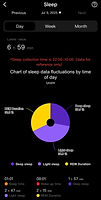
Click on Sleep in “Health” section of FitVibe app to access more detailed info
-
Raise Watch to Wake

Accessed through the “Screen” in Settings.

Set the start and end of the period allowing the watch to wake after raising arm
-
Watch Instructions

-
Raise the watch to wake
-
Newly purchased watches should be charged before first use and recharged after the first charge is fully depleted for optimal battery performance.
-
This guide may differ from the actual watch; please refer to the actual watch for accuracy.
-
The health data and recommendations provided are for reference only and are not intended for diagnosis or treatment.
-
Wearing the watch near the wrist bone provides more accurate data (as shown in the image).
-
Maintain a comfortable fit and avoid any tightness.
-
After wearing the watch for 5 seconds, the sensor indicator will light up and data collection will begin.
-
Attention when using
-
1. Watch should not be used while driving to avoid
accidents, use in a safe place
2. This is a communication device. IP67 Waterproof
level, do not use during swimming, diving, sauna and
shower
3. Do not use where watches are prohibited (Hospitals, Aircraft) so as not to cause interference with
electronics and medical equipment. Follow the
requirements
4. If the consumer wishes to use their own power
adapter, it should have a CCC certification and meets
the standard requirements (Note: output end of
adapter is 5V=1A)
5. This device has a non removable battery. Please do not place the watch in high temperatures during
charging to avoid affecting lifespan and performance
6. Do not use the watch near electronic devices that
are susceptible to interference, otherwise it may cause the equipment to fail. Devices include hearing aids,
pacemakers and other medical equipment, fire alarms, automatic doors. Please consult the manufacturers of these equipment to avoid causing disturbance